Refreshing Client Secrets
In every app's life there comes a time, when the secrets simply don't get you places anymore, no matter how many tries. Unfortunately, such is the nature of client-secret-lifecycle and since currently this is not fully automated - one needs to remember to refresh them when such time comes.
First things first
If we get some complaint that something is no longer working, like the example we see in the picture:

we should first make sure to find the entity and check if the client secrets there are truly expired. The easiest way to
do that is to copy the ID seen in the error (db34fc7b-3e04-48cb-887d-6d0d6a27acda in this case) and paste it in the
Azure Portal's search bar.
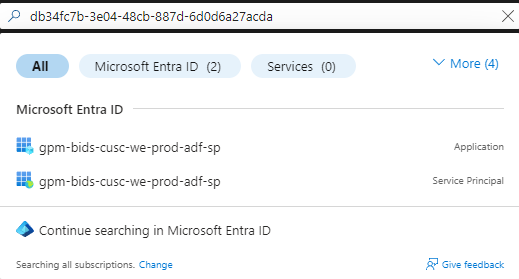
We should be able to find the associated Application and after navigating to Certificates & Secrets of it we should see
that the Expires value is already in the past.
Terraform Common AAD
These service principles are created nowhere other than the repository that manages repositories, teams and other entities - terraform-common-aad
In this repo, in the environments/prod/variables.tf file, you should find the expired Application block and add field
password_rotate_when_changed = "day.month.last_two_digits_of_a_year" with the todays date.
In our example it would've been gpm-bids-cusc-we-prod-adf-sp
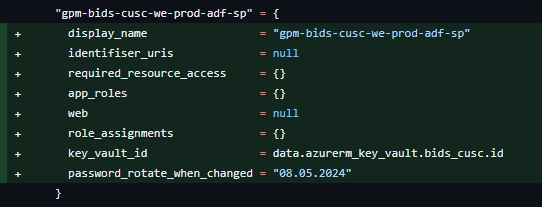
You can also use this commit as an example. Once this change is applied the Client Secret will refresh for at least one more year.
So, in case you wanted to be at the forefront of these changes, you could set-up an reminder in Slack, like so:
/remind me Refresh `some-entity-sp` client secret August 5 every year
Writing /remind in slack shall give you more information on how to modify the syntax.